
The AI Bill Was Under $2. The Real Cost Was Somewhere Else
For leaders deciding whether their AI spend is working.
A hiking expedition report that would take an expert one to two days by hand now takes about an hour of human time. That sounds like a clear win, but whether it is depends on what you count. It’s the same question companies run into when they look at what their AI spend is actually delivering.
The Question Companies Can’t Answer
When I talk with companies about their AI spend, there’s often an assumption that it’s working and paying for itself. Employees say they’re more productive with the tools that have been enabled, and they probably are. What’s less clear is what that translates to in the company’s financials, and there’s usually no data behind the claim.
Whether the spend comes from seat plans that cap usage or from metered API calls, the pattern is the same. Usage grows until someone adds limits or buys more capacity. Much of it never shows up as a line item: AI arrives inside software the company already pays for, or on an employee’s own card. And a lot of what goes through the models isn’t needed for what the person was trying to do. It’s easy to throw everything at AI and not be selective about the input.
I advise companies on technology and AI spend, so I wanted to see what a real answer looks like. I measured a small case of my own. It is small, but the question it answers is the same one larger budgets raise.
The Small Case
The case is an AI product I built and run myself for planning backpacking trips in the Eastern Sierras. Before a trip, people tell me how ready they think they are, and readiness varies a lot, so a plan that fits one person is wrong for another.. The product takes activity files from their fitness apps and builds a readiness assessment for the objective. It adds a training plan, a nutrition protocol, gear, footwear and pack-fit feedback, a day-by-day itinerary, permits, campsites, water and resupply. An expert reviews every report before it goes out. Assembled by hand, a report like this takes an expert many hours, which made it a good thing to measure.
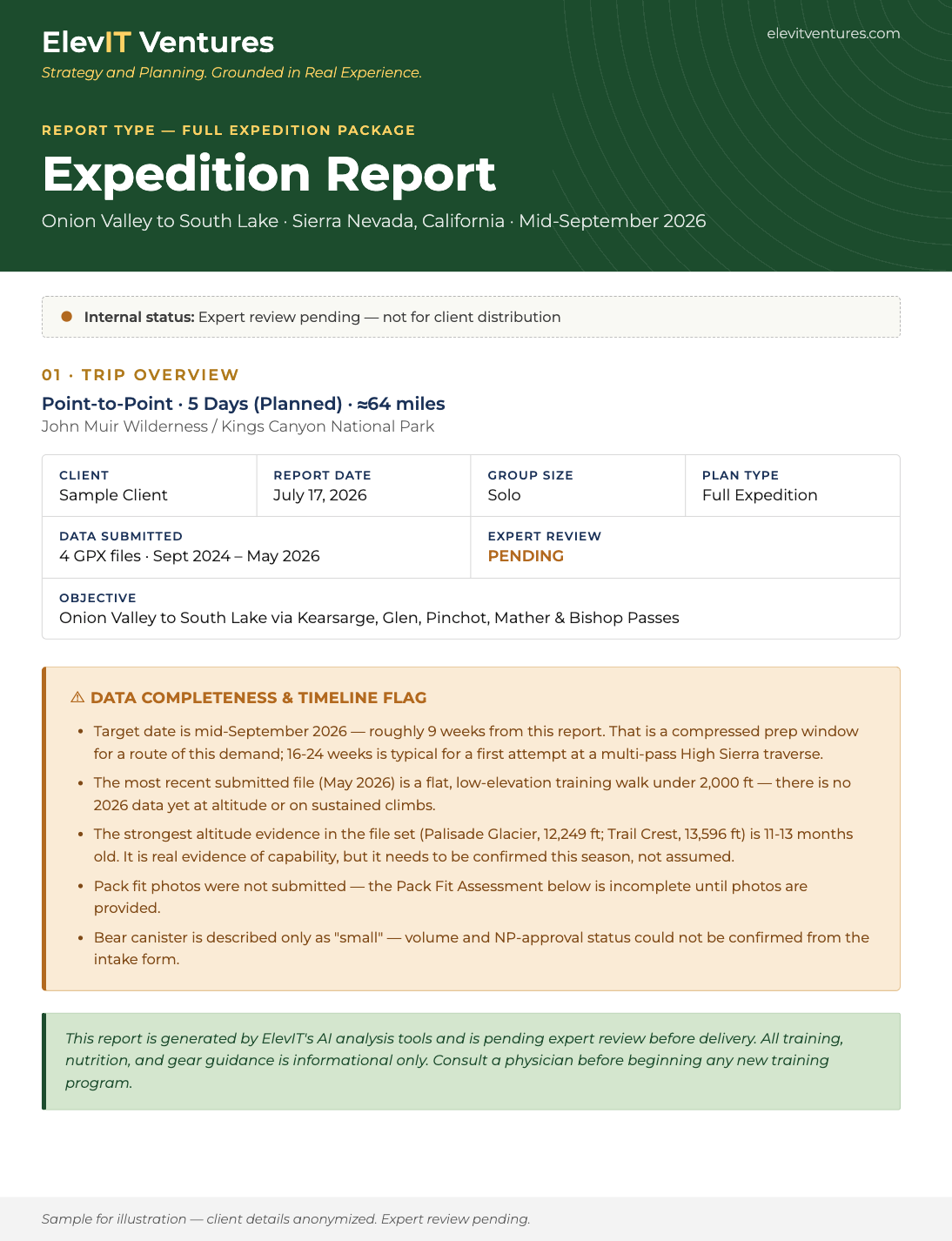
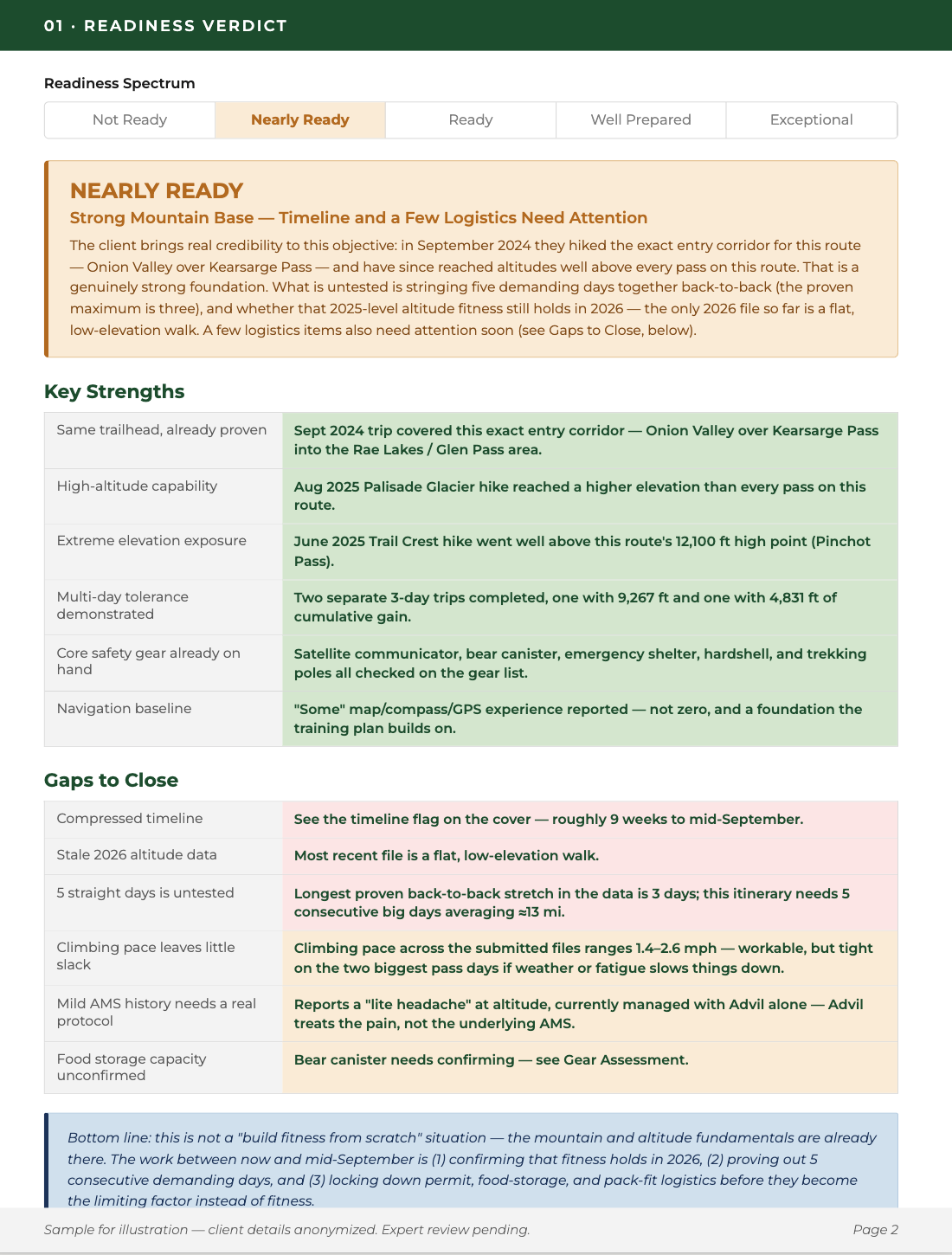
Pages one and two of a sample report. Status stays “pending” until expert review is complete.
What I Automated, and What I Didn’t
The customer submits one form with activity files, photos and a gear checklist, and a client folder is created automatically. A parser reduces the activity files to the fields the model needs. The data goes into one structured API call, which returns the analysis, and code I wrote assembles it into the finished report.
That parser mattered. In testing, sending whole GPS files was expensive, and what you send to the model turned out to be a cost decision, not just a technical one.
The same call also reviews photos of footwear and a loaded pack for fit and gear feedback. It’s advisory, a visual check rather than a professional fit, and it recommends an in-person fit when warranted. It also says plainly what it can’t assess: when a client doesn’t submit pack photos, that section states it can’t be completed without them. In one report, it flagged worn outsoles on trail shoes from a photo.
Then a person takes over, and the expert’s time comes to about 70 minutes for the first delivery. The delivery email can’t send until the report is marked reviewed, so nothing ships ungated. A follow-up goes out automatically a week later.
The machine side is fast. The automation step runs in under a second, and the scripts that parse the files, make the API call and build the draft take about 20 seconds for a full expedition plan. The automation runs once a day by design, which keeps cost low and predictable, so a submission can wait up to a day for pickup.
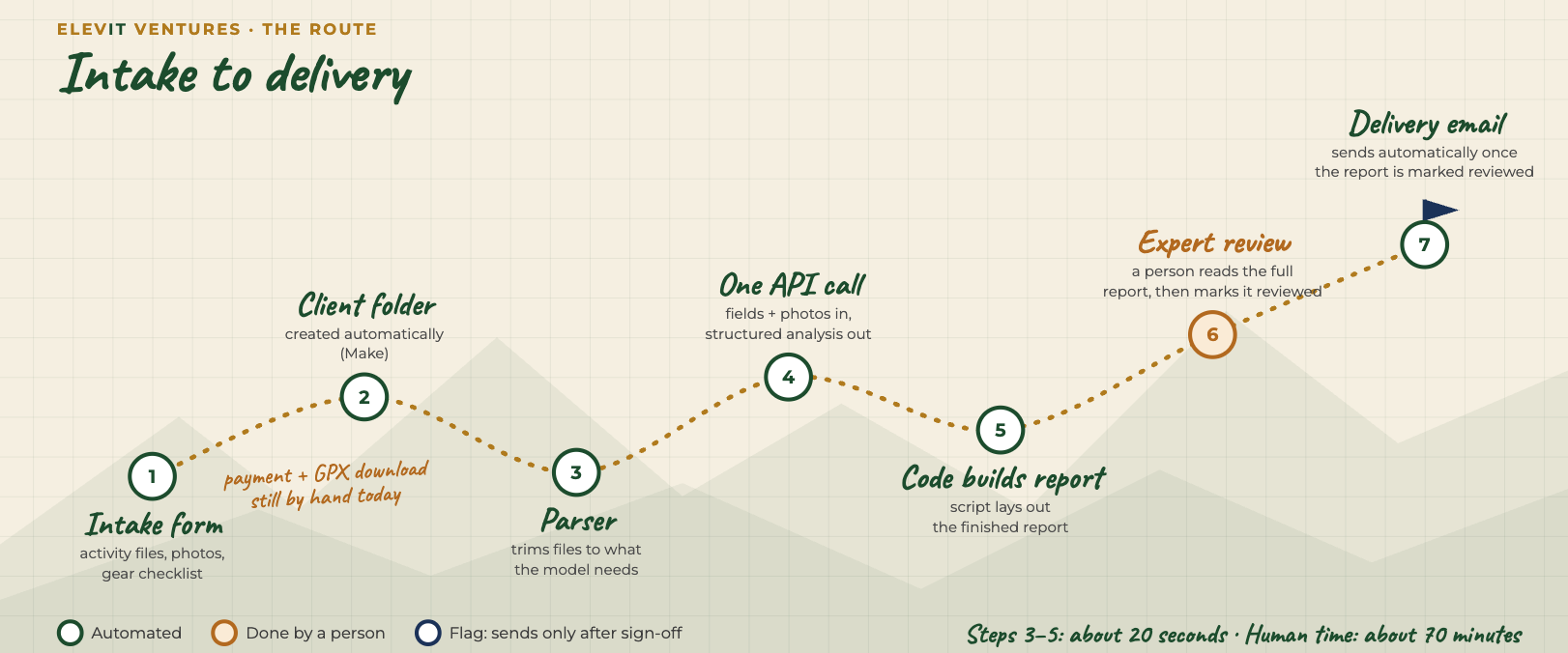
Green steps are automated. Nothing ships until a person signs off.
What the Numbers Show
I priced the full hiking Expedition Plan end to end. Done by hand, I estimate it takes an experienced practitioner roughly 10 to 18.5 hours, including checking their own work as they go. With the AI automation, hands-on time is about 70 minutes, including the payment and file checks and a full review. At a blended $100 per hour:
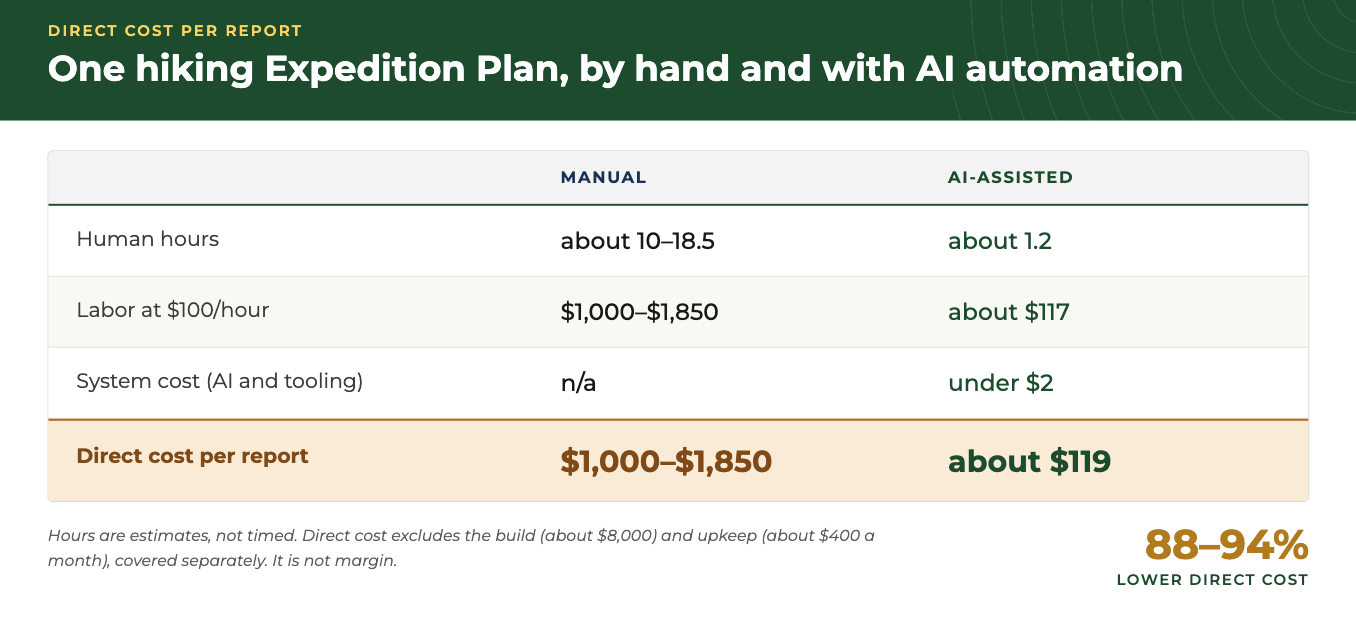
Direct cost per report. Hours are estimates.
That’s a reduction of roughly 88 to 94%. Because I budget a full hour for review and it often takes less, the saving is likely understated. If manual work took half as long as I estimate, it would still be 76 to 87%.
A note on the dollars. My Hours Saved piece warns against converting hours into dollars, and this table does exactly that. Here the conversion is defensible, for two reasons. These are costs per finished report, priced at a blended rate, not salary savings, and nobody’s job is on the line. And the workflow has one clear unit of output. The expert doesn’t go away; review is the part that remains. A company-wide rollout rarely has either property, which is why I’d keep hours and dollars apart there (see When “Hours Saved” Became “Heads No Longer Needed”).
The more interesting finding is where the remaining cost sits. System costs come to under 2% of the AI-path total, and nearly everything left is the human. The AI was the cheapest part of the work.
Why $100 an hour. It’s a blended rate across the roles involved, and it sits inside what posted prices show. Precision Nutrition puts the median nutrition coach at about $65 an hour, with the top tenth above $120, and ISSA gives $50 to $150 for most coaches and $125 to $200 or more for experienced ones. Posted package prices point the same way. A national service charges $399.95 for a custom trip plan with permits and an itinerary, a coach offers a three-session package with a training plan for $339, and a nutrition package is $150. Bought separately, that comes to about $889, with no combined readiness assessment and no gear review. That is what a buyer pays for partial coverage, not what it costs to build the full report by hand, which is why it sits below the table’s range. These are snapshots of posted prices, not a market study, and I checked them in October 2026.
What It Cost to Build
The AI automation took roughly 80 hours to build, an estimate. I worked on it part-time over about three months, with AI assisting the coding. That covers the parser, report generation, Google automation and the Make scenario for the hiking path. Upkeep runs about four hours a month. At $100 an hour, which is below my usual rate, that’s about $8,000 of build and $400 a month of upkeep. Against savings of roughly $880 to $1,730 per plan, the build pays back in about 5 to 17 plans, depending on monthly volume. So far it hasn’t paid back, because volume is still low. I include it because a return without the investment behind it is only half a number.
The practical effect is capacity: in principle, one expert can deliver far more plans per week. That’s capacity, not a reason to cut anyone. Reports are delivered within 5 to 7 days of deposit and completed intake, and that has held so far. What’s untested is higher volume, so more throughput is potential, not demonstrated.
This is a small workflow, not an enterprise rollout, so it doesn’t prove enterprise ROI. It does raise the questions any company has to answer: what work went away, what work remained, what it costs to build and keep running, and whether the time released actually gets used. At scale, integration, security and coordination add cost. They don’t remove the need to measure the workflow.
Why the Human Stays
Review is a full read of the report, not a spot check. I budget an hour per plan on purpose, because thoroughness shouldn’t depend on how clean the draft looks. Typically it takes less. Early on, review meant real rework. Each time I found a problem, I fixed it at the source, in the script or in the instructions I give the model, so it wouldn’t come back, and since late July the changes have been minor. When something still needs a small fix, I make it directly in the report, mark it reviewed, and rewrite the expert note in my own words.
I review every report myself today, and I bring in others where a trip needs it. For twenty years I’ve put together backcountry plans for Scout troops and other groups across the Eastern Sierra, covering gear, trail and camp meals, and multi-summit routes, and groups have used those plans on real trips. That’s experience, not a certification. I can judge route feasibility, permits, trail conditions, and gear and food for these mountains. I’m not a nutritionist, and the report is advisory, not medical or clinical nutrition advice.
Review has caught a few kinds of problems. Two came while preparing for production, and both were data problems, not AI problems: elevation figures that shifted within one report because of how my parser summarized the files, and gradient spikes of 30% on a trail I knew was closer to 15%, which were GPS noise from the device. I fixed both in the parser, so the model now gets cleaner inputs and review no longer has to catch them. Totals were the same kind of fix: the script now computes the daily and overall figures instead of the model. The last came after launch. A multi-day plan placed camps in an area affected by fire, and the client wanted wooded terrain. The model couldn’t know current conditions. I could, because I knew the area firsthand, so I had it re-plan around unaffected locations. That’s the part that needs someone who knows the ground. It also has a limit: my experience covers the areas I’ve been in, not necessarily this season, so conditions like fire damage and closures still need to be verified with the land manager before anyone heads out.
What to Ask About Your Own AI Spend
If your organization is deploying AI tools right now, three questions will tell you more than most ROI slides.
What share of the output needs human correction (your correction rate)? If you can’t name the share, you don’t have a value number. In my case it fell as I fixed problems at the source instead of at review.
How long does review take, rework included, and is it shrinking? Review is the cost that stays. Tracking it per output also tells you whether your fixes are working.
What does each accepted output cost, including building and maintaining the AI automation? The AI and tooling cost under $2 per plan. The costs that mattered were people’s time and building the automation, and neither shows up on an AI invoice.
Pick one AI-assisted workflow and log those three numbers for a month.
The Bigger Lesson
AI spend tends to be measured by the invoice, which is the smallest and easiest number to find. The value, and most of the cost, sits in human time before and after the model runs. Organizations that can name their correction rate, their review time and their cost per accepted output have a number. The rest have a feeling.
None of this says the model can run unreviewed. In my case, review is what keeps the output trustworthy.
If your organization is spending on AI and can’t yet answer those three questions, that’s the kind of thing a scoping call is built for.
A note on the math: $100 blended hourly rate on both sides; an experienced practitioner; checking included in the manual estimate; manual hours are my estimates, not timed; system cost is estimated until logged. Because the same hourly rate is applied to both paths and to build time, the percentage reduction and the payback in plans barely depend on it; mostly the dollar amounts do. A separate estimate generated with another AI tool put a fully manual plan at 20 to 35 hours, so mine is the conservative end. Direct cost is not margin. Not included: costs that exist either way, such as the company, website, banking, insurance, accounting, payment processing and marketing; and client communication, the included revision round and progress updates.
Sources: Precision Nutrition, How much should nutrition coaches charge; ISSA, What should I charge for nutrition coaching.
